A sticky navigation stays at the top of the screen as visitors scroll, so the menu is always in reach.
Requires GP Premium — Menu Plus module. The whole guide is a GP Premium feature; the menu item height control also needs the Spacing module.
Appearance → Customize → Layout → Sticky Navigation
Settings
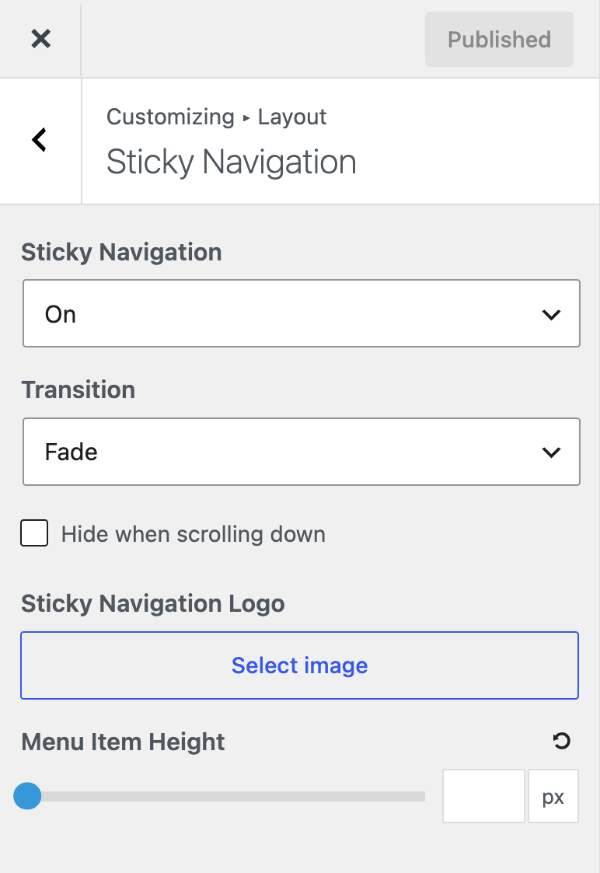
Set Sticky Navigation to Mobile only, Desktop only or On to make the primary navigation stick to the top of the screen. Once it’s on:
- Transition — Fade (default) or Slide in as you scroll, or None to simply stick.
- Hide when scrolling down — hide it while scrolling down; it returns when scrolling up. Saves space, especially on phones.
- Sticky Navigation Logo — a logo shown only in the sticky navigation.
- Menu Item Height (Spacing module) — a different height while sticky. Empty by default, so it uses the Primary Navigation height. With navigation as header, a lower value makes the header shrink as you scroll.
For the phone-only header bar, see Mobile header. To show the navigation only once it’s sticky, see the recipe.
Recipes & customizations
Recipes add code as explained in Adding Custom Code.
Show the sticky navigation only
To hide the normal navigation and show it only once it becomes sticky:
#site-navigation:not(.navigation-stick) {
    visibility: hidden;
    height: 0;
    overflow: hidden;
}

#sticky-placeholder {
    display: none !important;
}
All options
| Setting | Section | Choices | Default | Requires | Customizer option |
|---|---|---|---|---|---|
| Sticky Navigation | Sticky Navigation | Mobile only · Desktop only · On · Off | Off | GP Premium — Menu Plus | generate_menu_plus_settings[sticky_menu] |
| Transition | Sticky Navigation | Fade · Slide · None (shown when sticky is on) | Fade | GP Premium — Menu Plus | generate_menu_plus_settings[sticky_menu_effect] |
| Hide when scrolling down | Sticky Navigation | On / Off (shown when sticky is on) | Off | GP Premium — Menu Plus | generate_menu_plus_settings[auto_hide_sticky] |
| Sticky Navigation Logo | Sticky Navigation | Image (shown when sticky is on) | — | GP Premium — Menu Plus | generate_menu_plus_settings[sticky_navigation_logo] |
| Menu Item Height | Sticky Navigation | 20–150 px (shown when sticky is on) | Inherits Primary Navigation | GP Premium — Menu Plus, Spacing | generate_spacing_settings[sticky_menu_item_height] |
Settings can be changed in code with the option_generate_menu_plus_settings filter.
Related
- Header — navigation as header, with a shrinking sticky header; mobile header
- Primary Navigation — the navigation that becomes sticky
- Off-Canvas Panel — a slide-in menu and widget area
- Developer reference: Settings defaults filters