The footer has two parts: the footer widgets (up to five columns of widgets) and the footer bar below them, which holds the copyright message and its own widget area. This guide covers their layout, the back-to-top button and the copyright. Footer colours are in Colors.
Most options are free. The Copyright field needs GP Premium’s Copyright module, and footer padding needs Spacing.
Settings: Appearance → Customize → Layout → Footer
Widgets: Appearance → Widgets → Footer Widget 1–5 and Footer Bar
Per page: the Footer Widgets tab of the Layout meta box
Settings
Footer width
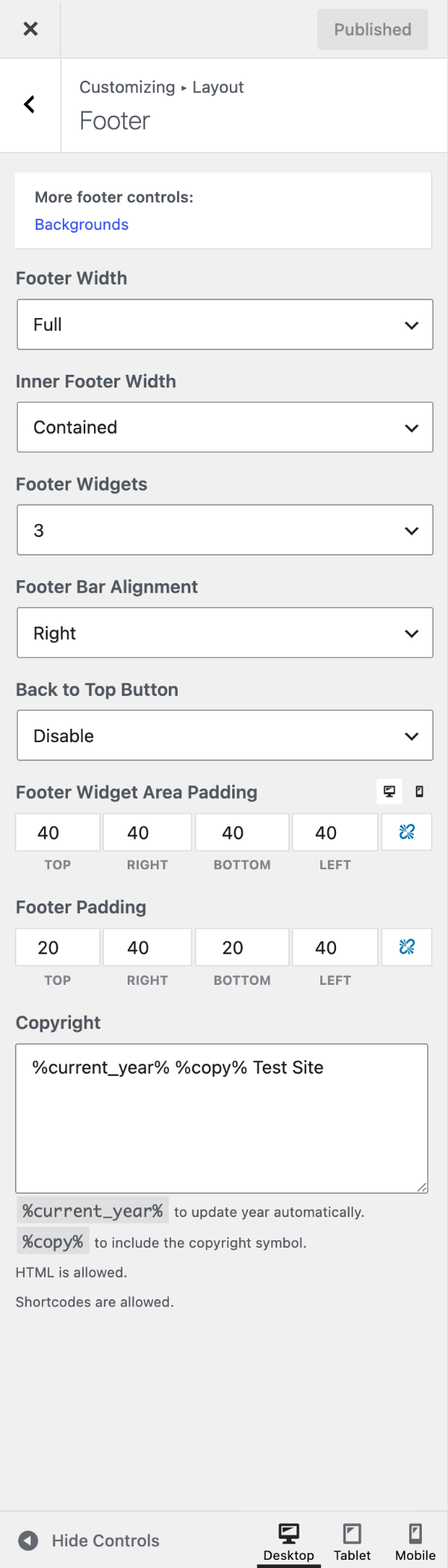
- Footer Width — the outer container for the whole footer, which carries the background. Full (default) spans the screen; Contained matches your container width.
- Inner Footer Width — the container holding the widgets and footer bar. Contained (default) or Full.
Footer widgets
Footer Widgets sets how many footer widget columns show, from 0 to 5 (default 3). Add widgets to each under Appearance → Widgets → Footer Widget 1–5.
To change the number on one page or post, use the Footer Widgets tab of the Layout meta box. For groups of pages, use a Layout Element (GP Premium) or the filter recipe. To make the columns different widths, see the recipe.
Footer bar widget area
The footer bar has a widget area beside the copyright message — handy for a footer menu or social icons. Add widgets under Appearance → Widgets → Footer Bar.
- Footer menu: create a menu, then add a Navigation Menu widget to the Footer Bar and choose it.
- Social icons: add a Social Icons block.
Once the area has a widget, Footer Bar Alignment appears: Left, Center or Right (default).
Back to top button
Back to Top Button adds a button at the bottom right of the screen, once visitors scroll, that takes them back to the top. Its colours are in Colors → Back to Top. To move or restyle it, or change its timing, see the recipes.
Copyright
Requires GP Premium — Copyright module.
Type your own message in the Copyright field. Use %current_year% for the current year and %copy% for the © symbol. Without GP Premium, change it with the filter recipe.
Footer padding
Requires GP Premium — Spacing module.
- Footer Widget Area Padding — space around the footer widgets, per side, with separate desktop and mobile values (default 40px all sides).
- Footer Padding — space inside the footer bar (the copyright area), per side (default 20px top/bottom, 40px left/right).
Recipes & customizations
Recipes add code as explained in Adding Custom Code.
Set the number of footer widgets with a filter
A Layout Element does this without code. In PHP, return 0–5 from generate_footer_widgets with a conditional tag:
add_filter( 'generate_footer_widgets', function( $widgets ) {
    // WooCommerce pages: 2 columns.
    if ( function_exists( 'is_woocommerce' ) && is_woocommerce() ) {
        return '2';
    }

    // Category archives: 4 columns. Search results: 1.
    if ( is_category() ) {
        return '4';
    }

    if ( is_search() ) {
        return '1';
    }

    return $widgets;
} );
Different widths for each footer widget
Columns share the width equally. To change that, set a flex-basis for each column — they should add up to 100%:
.footer-widgets .footer-widget-1 {
    flex-basis: 56%;
}

.footer-widgets .footer-widget-2 {
    flex-basis: 22%;
}

.footer-widgets .footer-widget-3 {
    flex-basis: 22%;
}
Move the back to top button
To show it on the bottom left instead of the right:
.generate-back-to-top,
.generate-back-to-top:visited {
    bottom: 30px;
    left: 30px;
    right: auto;
}
Restyle the back to top button
Colours are in Colors → Back to Top. For size and shape:
.generate-back-to-top,
.generate-back-to-top:visited {
    border-radius: 3px; /* Roundness */
    line-height: 40px;  /* Height */
    width: 40px;        /* Width */
}
Back to top speed and start point
How long the scroll to the top takes, in milliseconds (generate_back_to_top_scroll_speed):
add_filter( 'generate_back_to_top_scroll_speed', function() {
    return 400;
} );
How far down the page the button appears, in pixels (default 300; generate_back_to_top_start_scroll):
add_filter( 'generate_back_to_top_start_scroll', function() {
    return 300;
} );
Change the copyright message with a filter
Without GP Premium, use generate_copyright. The message can include HTML:
add_filter( 'generate_copyright', function() {
    return '© ' . date( 'Y' ) . ' Your Company. All rights reserved.';
} );
Remove the footer bar
To remove the footer bar (copyright and footer bar widgets) completely:
add_action( 'after_setup_theme', function() {
    remove_action( 'generate_footer', 'generate_construct_footer' );
} );
To replace the whole footer with your own design, see Block Elements › Site Footer (GP Premium).
All options
| Setting | Section | Choices | Default | Requires | Customizer option |
|---|---|---|---|---|---|
| Footer Width | Footer | Full / Contained | Full | — | generate_settings[footer_layout_setting] |
| Inner Footer Width | Footer | Contained / Full | Contained | — | generate_settings[footer_inner_width] |
| Footer Widgets | Footer | 0–5 | 3 | — | generate_settings[footer_widget_setting] |
| Footer Bar Alignment | Footer | Left / Center / Right (shown when the Footer Bar has a widget) | Right | — | generate_settings[footer_bar_alignment] |
| Back to Top Button | Footer | Enable / Disable | Disable | — | generate_settings[back_to_top] |
| Copyright | Footer | Text / HTML | — (theme default message) | GP Premium — Copyright | generate_copyright |
| Footer Widget Area Padding | Footer | Top / Right / Bottom / Left, px; desktop and mobile | 40 (desktop) | GP Premium — Spacing | generate_spacing_settings[footer_widget_container_top], [footer_widget_container_right], [footer_widget_container_bottom], [footer_widget_container_left], [mobile_footer_widget_container_top], [mobile_footer_widget_container_right], [mobile_footer_widget_container_bottom], [mobile_footer_widget_container_left] |
| Footer Padding | Footer | Top / Right / Bottom / Left, px | 20 top/bottom, 40 left/right | GP Premium — Spacing | generate_spacing_settings[footer_top], [footer_right], [footer_bottom], [footer_left] |
Settings can be changed in code with the option_generate_settings filter.
Related
- Block Elements › Site Footer — build the footer with blocks (GP Premium)
- Elements — Layout Elements for footer widgets across many pages
- Colors — footer and back-to-top colours
- Sidebars — sidebar widget padding
- Developer reference: Footer hooks, Layout, sidebars, footer and widgets filters, Scroll and back to top filters, Settings defaults filters