GeneratePress is built to be extended with code. Hooks let you add your own content or functions at set places in the theme, and filters let you change the theme’s values and output — all without editing theme files, so your changes survive updates. Every hook and filter is listed in the developer reference.
Hooks and filters are part of the free theme. With GP Premium, Hook Elements let you add content at a hook without writing PHP; they replaced the old GP Hooks module (see Legacy Features).
Add all code on this page as explained in Adding Custom Code.
How hooks and filters work
- Action hooks are points in the theme’s templates, such as
generate_before_headerorgenerate_after_entry_content. You attach a function to one withadd_action(), and it runs — printing its output — at that point on every page. - Filters pass a value through your function before the theme uses it, such as a sidebar layout, a label or a number of columns. You attach a function with
add_filter(), and whatever it returns is used instead. - Priority (the optional third argument, default 10) sets the order when several functions use the same hook or filter: lower runs first.
- Conditional tags such as
is_single()oris_front_page()let one function act only on some pages.
The reference pages are tagged GP Free or GP Premium, so you can see which need GP Premium.
Using hooks
GeneratePress uses the WordPress hooks API. To add content at a hook:
add_action( 'generate_before_header', function() {
    ?>
    <div class="my-notice">Insert your content here.</div>
    <?php
} );
Replace generate_before_header with the hook you want — see the hooks visual guide and the developer reference. WordPress’s own hooks work too, such as wp_head.
If you use a named function instead of an anonymous one, give it a unique prefix (for example tu_insert_notice) so it can’t clash with another plugin.
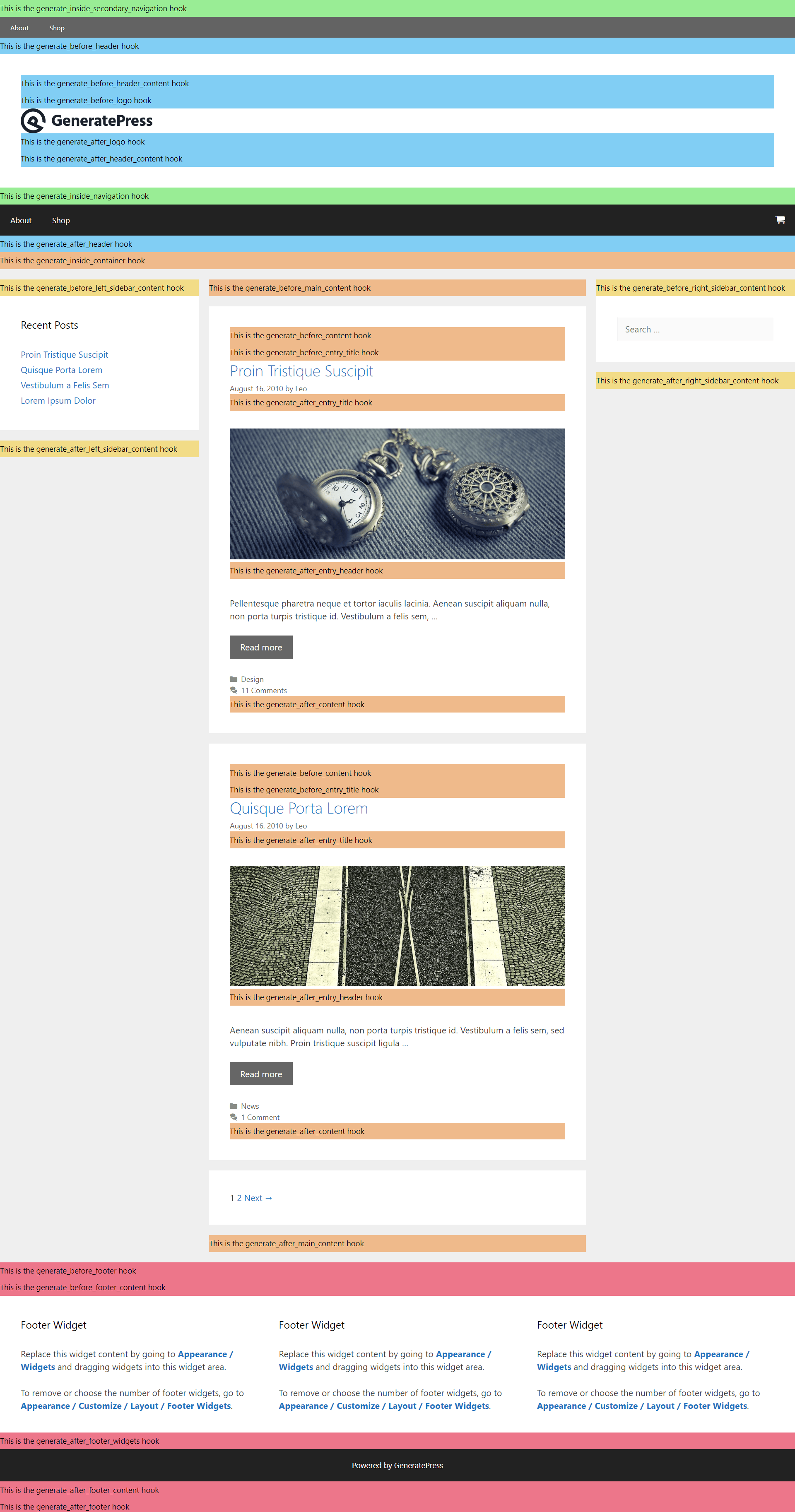
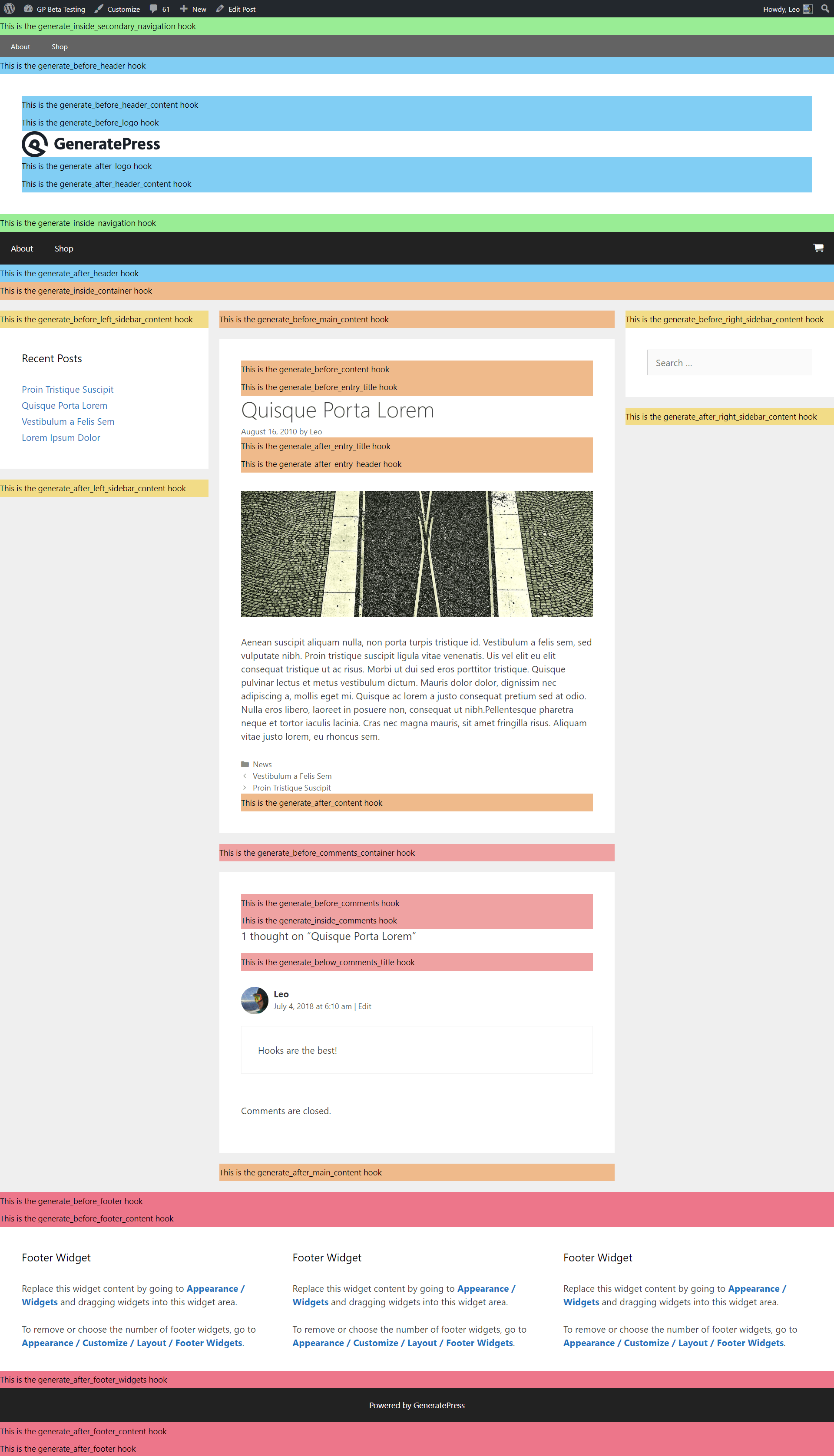
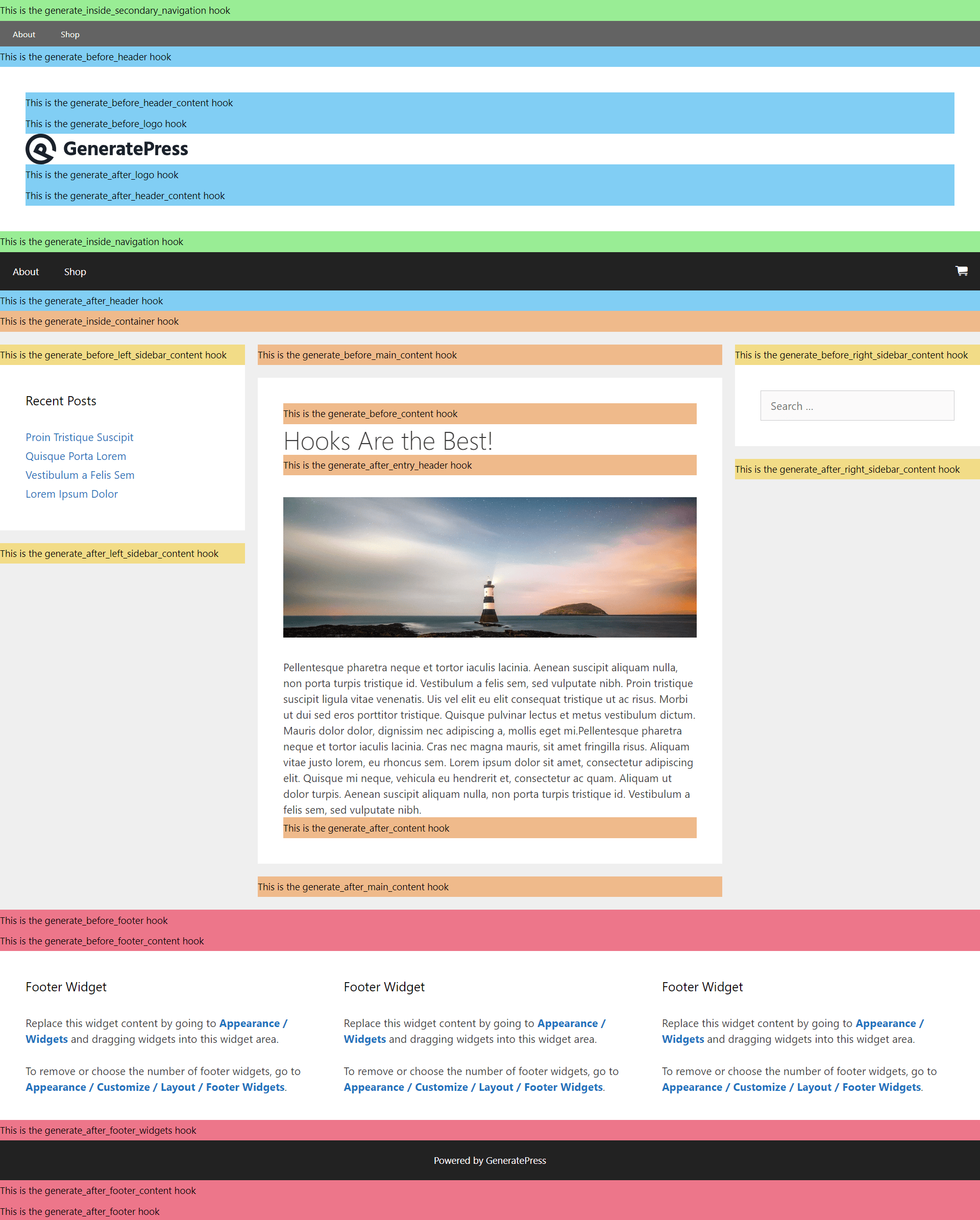
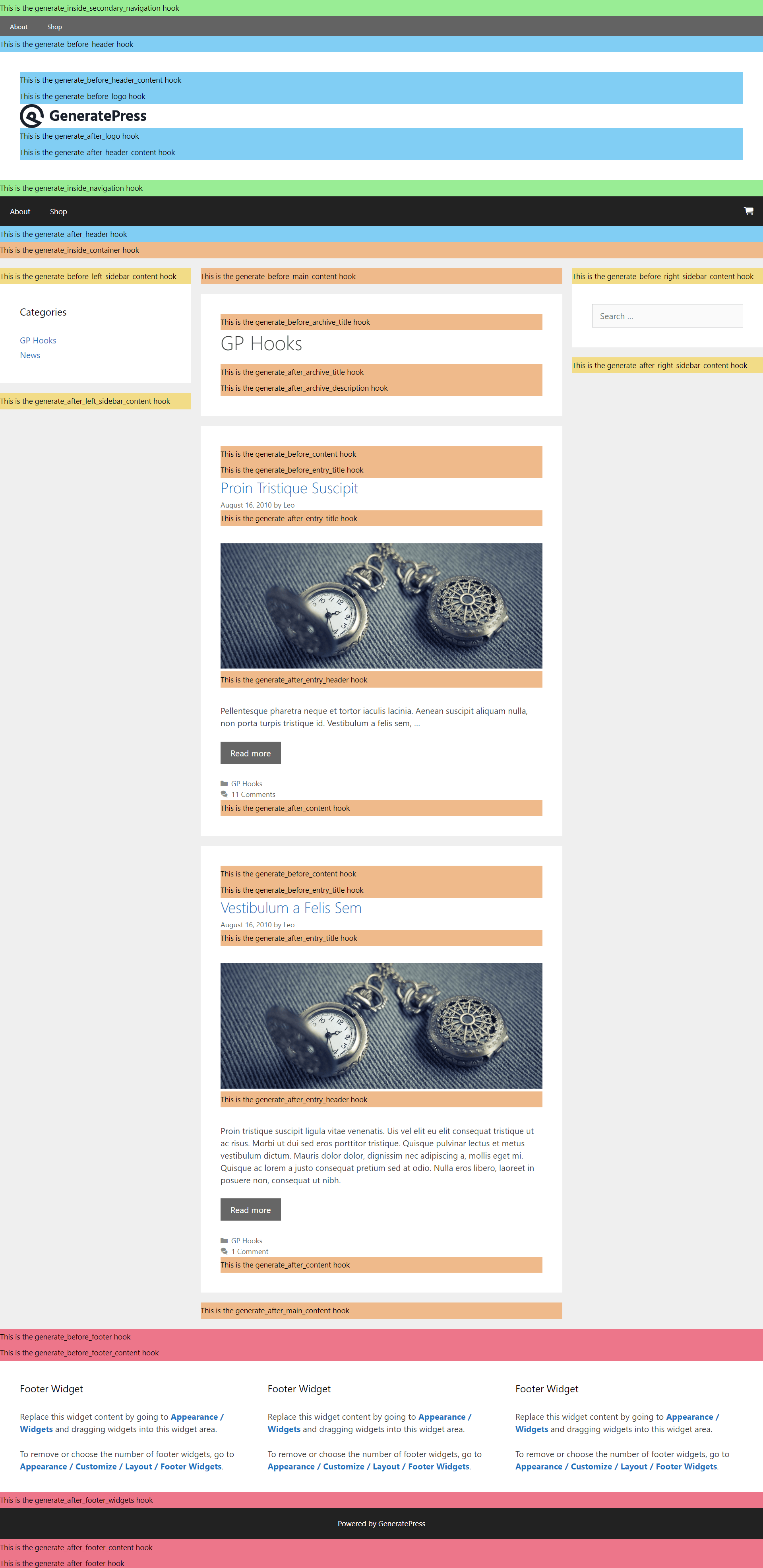
Hooks visual guide
These diagrams show where each GeneratePress hook sits on the page. Click an image to see it full size.
Posts page
Single post
Static page
Archives
Using filters
GeneratePress uses the WordPress filter API to let you change values, from options to text on your site. Your function receives the current value and returns the new one:
add_filter( 'generate_404_title', function( $title ) {
    return 'Nothing here';
} );
Replace generate_404_title with the filter you want — for example generate_sidebar_layout. All filters are in the developer reference. To change any Customizer setting in code, use the option_generate_settings family of filters; each guide’s All options table lists the setting names.
Recipes & customizations
Conditional tags
With a Hook Element, use Display Rules to choose where content shows — no code needed. In PHP, wrap your hook’s output in a conditional tag:
add_action( 'generate_after_header', function() {
    if ( is_single() ) {
        echo '<div class="my-banner">Only on single posts</div>';
    }
} );
Common tags:
| Tag | True on |
|---|---|
is_home() | The blog (posts) page |
is_front_page() | The front page, whether a static page or your latest posts |
is_front_page() && is_home() | The front page when it shows your latest posts |
is_single() | Single posts |
is_page() | Static pages |
is_archive() | Category, tag, author and date archives |
Add ! to exclude instead — ! is_home() is everywhere except the blog page.
Disallow PHP execution
Requires GP Premium — Elements module.
Hook Elements can run PHP when Execute PHP is ticked. On sites where file editing is disabled, that option is unavailable too — WordPress recommends disabling file editing, and some security plugins do it for you by adding this to wp-config.php:
define( 'DISALLOW_FILE_EDIT', true );To turn off PHP in Hook Elements while leaving file editing on, add this constant to wp-config.php:
define( 'GENERATE_HOOKS_DISALLOW_PHP', true );Creating a shortcode
A shortcode lets you place PHP output anywhere a shortcode works — in content, a widget or a Hook Element. This creates [my_shortcode]:
add_shortcode( 'my_shortcode', function() {
    ob_start();
    // Start your PHP below.
    echo 'Shortcode example';
    // End your PHP above.
    return ob_get_clean();
} );
Add a class to the body element
add_filter( 'body_class', function( $classes ) {
    $classes[] = 'my-custom-body-class';

    return $classes;
} );
Google Tag Manager
Google Tag Manager gives you two pieces of code: one for the <head> and one straight after the opening <body> tag.
With Hook Elements (GP Premium):
- Create a Hook Element with the first piece of code, choose the
wp_headhook, and set the display rules to Entire Site. - Create a second Hook Element with the second piece of code, choose the
wp_body_openhook with Priority0, and set it to Entire Site.
With PHP — replace GTM-XXXX with your container ID:
add_action( 'wp_head', function() {
    ?>
    <!-- Google Tag Manager -->
    <script>(function(w,d,s,l,i){w[l]=w[l]||[];w[l].push({'gtm.start':
    new Date().getTime(),event:'gtm.js'});var f=d.getElementsByTagName(s)[0],
    j=d.createElement(s),dl=l!='dataLayer'?'&l='+l:'';j.async=true;j.src=
    'https://www.googletagmanager.com/gtm.js?id='+i+dl;f.parentNode.insertBefore(j,f);
    })(window,document,'script','dataLayer','GTM-XXXX');</script>
    <!-- End Google Tag Manager -->
    <?php
} );

add_action( 'wp_body_open', function() {
    ?>
    <!-- Google Tag Manager (noscript) -->
    <noscript><iframe src="https://www.googletagmanager.com/ns.html?id=GTM-XXXX" height="0" width="0" style="display:none;visibility:hidden"></iframe></noscript>
    <!-- End Google Tag Manager (noscript) -->
    <?php
}, 0 );
Templates for a custom post type
To give a custom post type its own single-post template in a child theme:
- Register the post type — with
register_post_type()or a plugin such as Custom Post Type UI. Note its slug, for exampleproject. - Copy the templates. Copy the theme’s
single.phpandcontent-single.phpinto your child theme and rename them to match the slug:single-project.phpandcontent-project.php. - Point the single template at your content template. In
single-project.php, replace:
generate_do_template_part( 'single' );with:
get_template_part( 'content', 'project' );- Edit
content-project.phpto change the layout of the post’s content.
Related
- Developer reference — every hook and filter
- Adding Custom Code — where to add PHP and CSS, and child themes
- Elements — Hook Elements and display rules
- Block Elements › Hook — block content at a hook