The Blog section controls how posts appear on your blog, archives and single posts: excerpts or full content, which post details show, featured images, and columns or masonry.
Content Type (full content or excerpt) is free. Everything else in this section needs GP Premium’s Blog module.
Appearance → Customize → Layout → Blog
Settings
Each part of the section has tabs: Archives (blog, categories, tags, search and other archives) and Single (single posts); Featured Images also has Pages.
Content
Archives
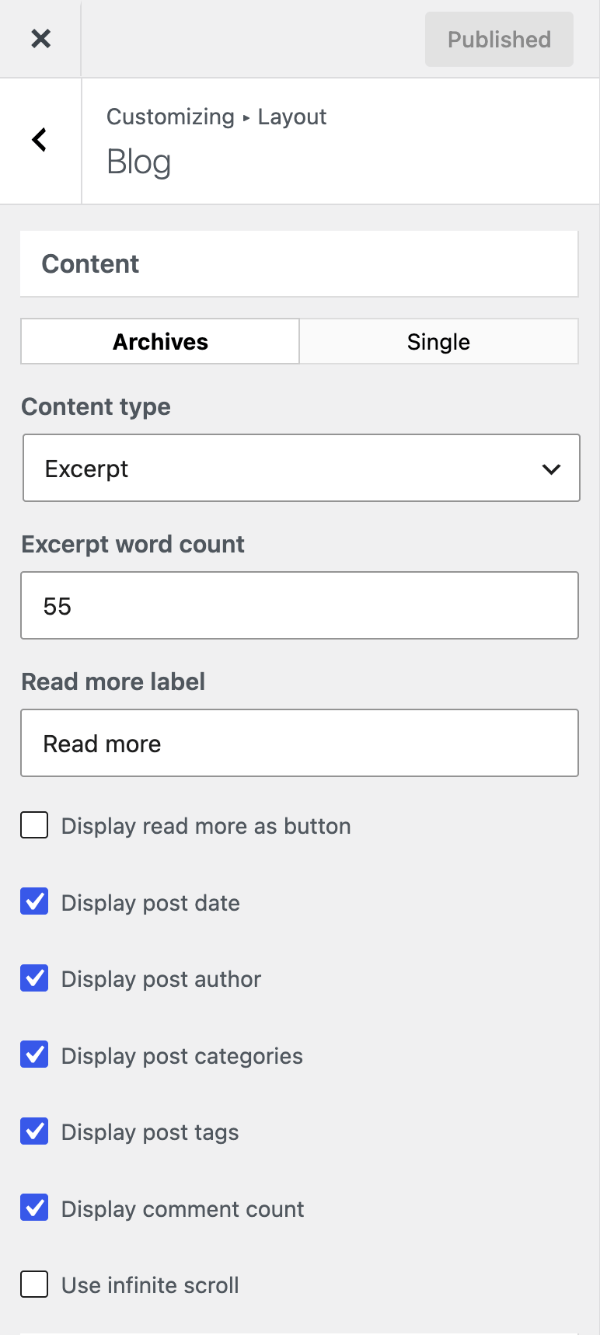
- Content Type — Excerpt (default) or Full Content.
- Excerpt word count — excerpt length (default 55). Set 0 to hide excerpts.
- Read more label — the link text after an excerpt (default “Read more”); leave empty to remove it.
- Display read more as button — style the link as a button, using your button colours and typography.
- Display post date / author / categories / tags / comment count — show or hide each item.
- Use infinite scroll — load the next posts automatically as visitors scroll. Tick Use button to load more posts to load them on click instead, and change the Load more label and Loading label.
Excerpts not behaving? See Troubleshooting › Excerpt issues.
Single
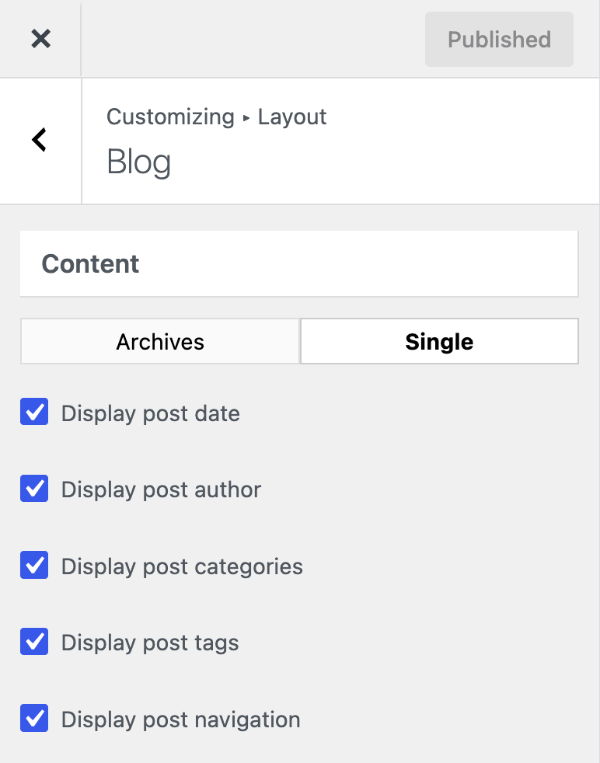
- Display post date / author / categories / tags — show or hide each item.
- Display post navigation — the previous and next post links.
To set these under other conditions, use the option_generate_blog_settings filter.
Featured images
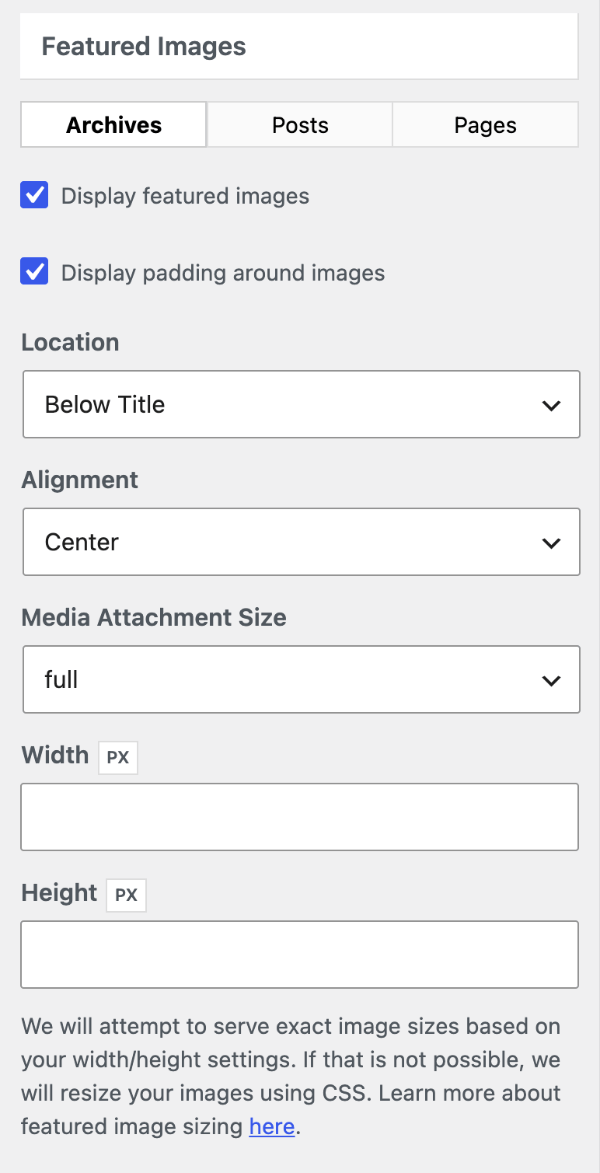
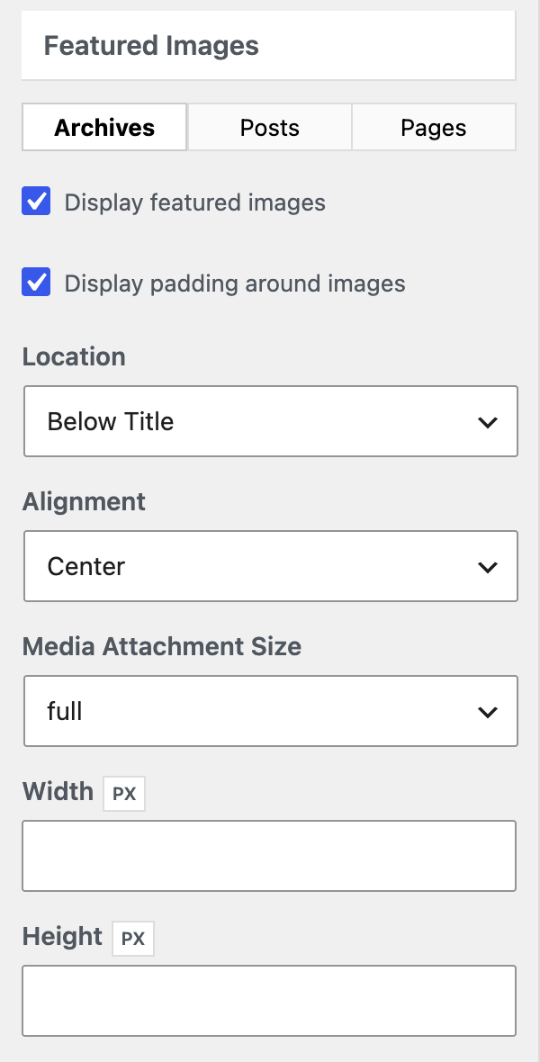
Set these separately for Archives, Posts and Pages:
- Display featured images — show or hide them.
- Display padding around images — with center alignment only.
- Location — archives: Below Title or Above Title; posts and pages: Below Title, Above Title or Above Content Area.
- Alignment — Center, Left or Right.
- Media Attachment Size — which image size to use, from Settings → Media or your own sizes. This is the best way to control file size.
- Width and Height — look for an existing image at that size and otherwise scale it with CSS; they don’t create new image files, so prefer Media Attachment Size.
How to set a featured image: Content › Adding featured images.
Columns & masonry
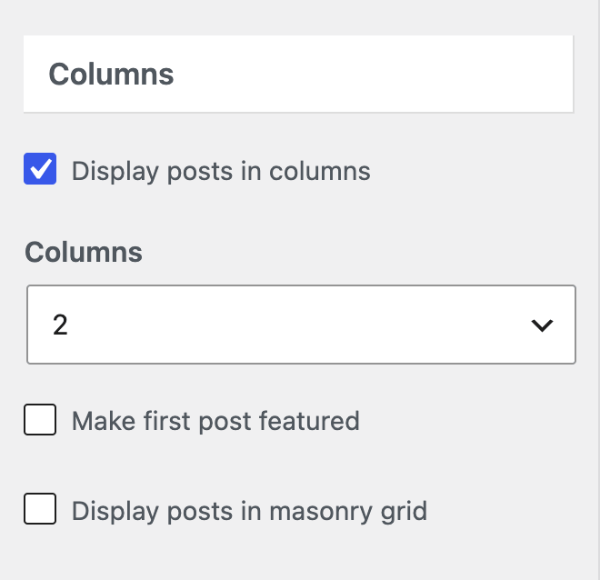
- Display posts in columns — turns on the options below.
- Columns — 2 (default), 3, 4 or 5.
- Make first post featured — show the latest post larger than the rest.
- Display posts in masonry grid — a staggered grid that fits posts of different heights.
The gap between columns is Separating Space in Container. Columns and masonry apply to posts only; for other post types, see the recipes.
Recipes & customizations
Recipes add code as explained in Adding Custom Code.
Excerpts
Read more with a custom excerpt
WordPress skips the Read more link when a post has a hand-written excerpt. To add it back as a link:
add_filter( 'wp_trim_excerpt', function( $excerpt ) {
    if ( has_excerpt() ) {
        $excerpt = sprintf( '%1$s <a href="%2$s">%3$s</a>',
            $excerpt,
            get_permalink(),
            __( 'Read more', 'generatepress' )
        );
    }

    return $excerpt;
} );
As a button
add_filter( 'wp_trim_excerpt', function( $excerpt ) {
    if ( has_excerpt() ) {
        $excerpt = sprintf( '%1$s <p class="read-more-button-container"><a class="button" href="%2$s">%3$s</a></p>',
            $excerpt,
            get_permalink(),
            __( 'Read more', 'generatepress' )
        );
    }

    return $excerpt;
} );
Excerpt word count in other languages
WordPress counts words by spaces, so excerpts in Chinese or Japanese come out the wrong length.
Chinese — trims to 50 characters and adds a Read more button:
add_filter( 'get_the_excerpt', function( $output ) {
    global $post;

    if ( preg_match_all( '/\p{Han}+/u', $post->post_content ) ) {
        $output = sprintf( '%1$s <p class="read-more-button-container"><a class="button" href="%2$s">%3$s</a></p>',
            mb_substr( $output, 0, 50 ) . '...',
            get_permalink(),
            __( 'Read more', 'generatepress' )
        );
    }

    return $output;
} );
Japanese — trims to 55 characters wide:
add_filter( 'get_the_excerpt', function( $excerpt ) {
    $is_japanese    = preg_match( '/[\x{4E00}-\x{9FBF}\x{3040}-\x{309F}\x{30A0}-\x{30FF}]/u', $excerpt );
    $excerpt_length = 55;

    if ( $is_japanese && mb_strwidth( $excerpt ) > $excerpt_length ) {
        return sprintf( '%1$s %2$s',
            mb_strimwidth( $excerpt, 0, $excerpt_length, ' ', 'UTF-8' ),
            generate_excerpt_more( '' )
        );
    }

    return $excerpt;
} );
Featured images
Adding image sizes
WordPress includes thumbnail, medium, large and full (Settings → Media). To add your own sizes for featured images (add_image_size):
add_action( 'init', function() {
    add_image_size( 'my-archive-featured-image', 500, 200, true ); // Width, height, crop
    add_image_size( 'my-single-featured-image', 800, 500 );
} );
Choose them under Media Attachment Size, then create the new sizes for existing images with a plugin such as Regenerate Thumbnails.
Featured image size with a filter
To use a different size under particular conditions, use generate_blog_image_attributes:
add_filter( 'generate_blog_image_attributes', function( $atts ) {
    if ( is_post_type_archive( 'portfolio' ) ) {
        $atts['width']  = 300;
        $atts['height'] = 300;
        $atts['crop']   = true;
    }

    return $atts;
} );
A different size for the featured post
With Make first post featured, give that post a larger image. Add two image sizes, set Media Attachment Size to the one for normal posts, then:
add_filter( 'generate_page_header_default_size', function( $size ) {
    if ( in_array( 'featured-column', get_post_class() ) ) {
        return 'your-featured-image-size-name';
    }

    return $size;
}, 20 );
Zoom on hover
.post-image {
    position: relative;
    overflow: hidden;
}

.post-image img {
    max-width: 100%;
    transition: all 0.3s;
}

.post-image:hover img {
    transform: scale(1.2);
}
Columns and masonry
Full-width featured post
.generate-columns-container .featured-column {
    width: 100%;
}
Columns for a custom post type
Use generate_blog_columns; replace CPT_SLUG:
add_filter( 'generate_blog_columns', function( $columns ) {
    if ( 'CPT_SLUG' === get_post_type() && ! is_singular() ) {
        return true;
    }

    return $columns;
} );
Change the number of columns
Return the column width as a percentage: 50 = 2 columns, 33 = 3, 25 = 4, 20 = 5. This uses 3 columns on search results:
add_filter( 'generate_blog_get_column_count', function( $count ) {
    if ( is_search() ) {
        return 33;
    }

    return $count;
} );
Masonry for a custom post type
add_filter( 'generate_blog_masonry', function( $masonry ) {
    if ( is_post_type_archive( 'portfolio' ) ) {
        return 'true';
    }

    return $masonry;
} );
Post meta and navigation
Entry meta styles
Three layouts for the post details (author, date, categories). Each needs PHP and CSS.
Example 1: Avatar, author, comments and date
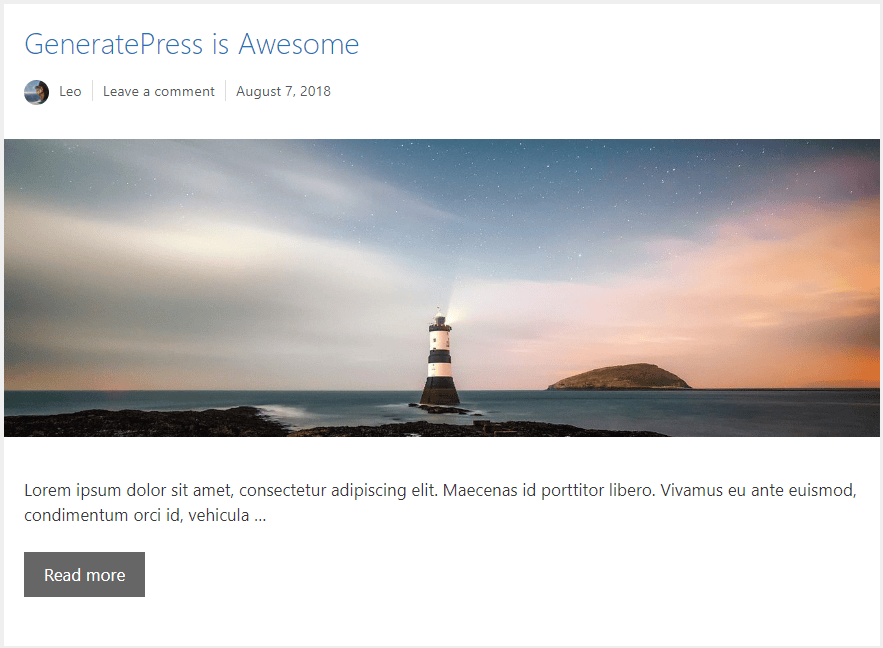
add_filter( 'generate_post_author_output', function() {
    return sprintf( ' <span class="byline">%1$s</span>',
        sprintf( '<span class="author vcard" itemtype="http://schema.org/Person" itemscope="itemscope" itemprop="author">%4$s<a href="%1$s" title="%2$s"><span class="author-name" itemprop="name">%3$s</span></a></span>',
            esc_url( get_author_posts_url( get_the_author_meta( 'ID' ) ) ),
            esc_attr( sprintf( __( 'View all posts by %s', 'generatepress' ), get_the_author() ) ),
            esc_html( get_the_author() ),
            get_avatar( get_the_author_meta( 'ID' ) )
        )
    );
} );

add_filter( 'generate_header_entry_meta_items', function() {
    return array( 'author', 'comments-link', 'date' );
} );

add_filter( 'generate_footer_entry_meta_items', function() {
    return array( 'categories', 'post-navigation' );
} );
.byline img {
width: 25px;
height: 25px;
border-radius: 50%;
position: relative;
vertical-align: middle;
margin: 0 10px 0 0;
}
.comments-link,
.posted-on {
border-left: 1px solid #ddd;
padding-left: 10px;
margin-left: 10px;
}Example 2: Avatar beside author, category and date
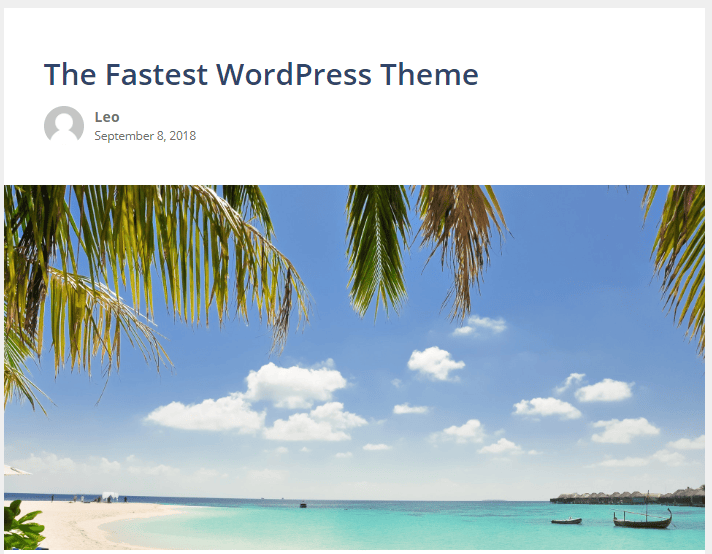
add_filter( 'generate_header_entry_meta_items', '__return_empty_array' );

add_action( 'generate_after_entry_title', function() {
    $post_types = apply_filters( 'generate_entry_meta_post_types', array( 'post' ) );

    if ( ! in_array( get_post_type(), $post_types ) ) {
        return;
    }
    ?>
    <div class="entry-meta entry-meta-container">
        <div class="entry-meta-gravatar">
            <?php echo get_avatar( get_the_author_meta( 'ID' ) ); ?>
        </div>
        <div class="entry-meta-info">
            <div class="entry-meta-author">
                <?php generate_do_post_meta_item( 'author' ); ?> in <?php generate_do_post_meta_item( 'categories' ); ?>
            </div>
            <div class="entry-meta-date">
                <?php generate_do_post_meta_item( 'date' ); ?>
            </div>
        </div>
    </div>
    <?php
} );
.entry-meta-container {
display: flex;
align-items: center;
}
.entry-meta-gravatar {
margin-right: 10px;
}
.entry-meta-gravatar img {
width: 50px;
border-radius: 50%;
}
.entry-meta-info {
display: block;
}Example 3: “Last updated” and “Written by”
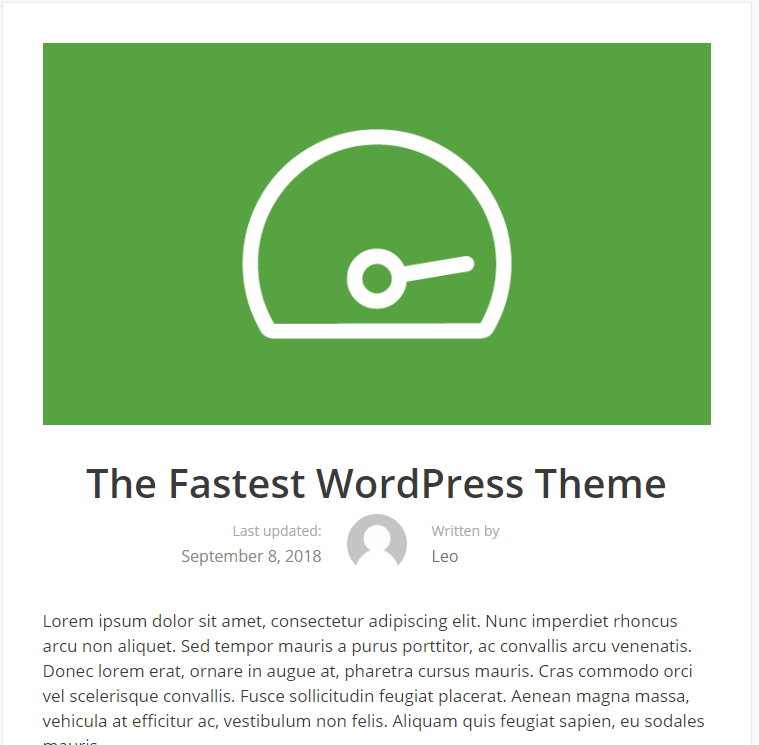
// Author image and link in separate containers.
add_filter( 'generate_post_author_output', function() {
    return sprintf( ' <div class="author vcard">%4$s</div><div class="author-wrap"><span class="label">Written by</span><a href="%1$s" title="%2$s"><span class="author-name" itemprop="name">%3$s</span></a></div>',
        esc_url( get_author_posts_url( get_the_author_meta( 'ID' ) ) ),
        esc_attr( sprintf( __( 'View all posts by %s', 'generatepress' ), get_the_author() ) ),
        esc_html( get_the_author() ),
        get_avatar( get_the_author_meta( 'ID' ) )
    );
} );

// Show the date, then the author.
add_filter( 'generate_header_entry_meta_items', function() {
    return array( 'date', 'author' );
} );

// Show the last updated date.
add_filter( 'generate_post_date_output', function( $output, $time_string ) {
    $time_string = '<span class="label">Last updated: </span><time class="entry-date published" datetime="%1$s" itemprop="datePublished">%2$s</time>';

    if ( get_the_time( 'U' ) !== get_the_modified_time( 'U' ) ) {
        $time_string = '<span class="label">Last updated</span><time class="entry-date updated-date" datetime="%3$s" itemprop="dateModified">%4$s</time>';
    }

    $time_string = sprintf( $time_string,
        esc_attr( get_the_date( 'c' ) ),
        esc_html( get_the_date() ),
        esc_attr( get_the_modified_date( 'c' ) ),
        esc_html( get_the_modified_date() )
    );

    return sprintf( '<div class="posted-on">%s</div> ', $time_string );
}, 10, 2 );
.entry-meta:not(footer),
.entry-meta .posted-on,
.entry-meta .author-wrap {
display: flex;
}
.entry-meta {
align-items: center;
justify-content: center;
}
.entry-meta .posted-on,
.entry-meta .author-wrap {
flex-direction: column;
font-size: 16px;
padding: 0 25px;
flex: 1;
}
.entry-meta .posted-on {
text-align: right;
}
.entry-meta .label {
font-size: 14px;
color: #aaa;
margin-bottom: 0.25em;
}
.author img {
width: 60px;
height: 60px;
border-radius: 50%;
vertical-align: middle;
}For the “Updated” date alone, see Content › Show the updated post date.
Entry meta on pages
The date and author show on posts only. To add them to pages, use generate_entry_meta_post_types:
add_filter( 'generate_entry_meta_post_types', function( $types ) {
    $types[] = 'page';

    return $types;
} );
Post navigation for custom post types
Display post navigation only applies to posts. To add the post navigation (and footer meta) to a custom post type, use generate_footer_meta_post_types and replace your-post-type:
add_filter( 'generate_footer_meta_post_types', function( $types ) {
    $types[] = 'your-post-type';

    return $types;
} );
Inline post navigation
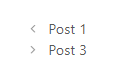

Put the previous and next links side by side:
.post-navigation {
    display: flex;
}

.post-navigation .nav-previous {
    width: 50%;
}

.post-navigation .nav-next {
    width: 50%;
    text-align: right;
    display: flex;
    flex-direction: row-reverse;
}

.post-navigation :not(.nav-previous) + .nav-next {
    width: 100%;
}

.nav-next .gp-icon {
    margin-left: 0.6em;
    margin-right: 0;
}
Archive pages
Change the title of an archive page
add_filter( 'get_the_archive_title', function( $title ) {
    if ( is_category( 'CATEGORY NAME' ) ) {
        $title = 'YOUR CUSTOM TITLE';
    }

    return $title;
}, 50 );
Category description on the first page only
The category description shows on every page of a category archive. To show it on page 1 only:
add_action( 'wp', function() {
    $page = get_query_var( 'paged' ) ? get_query_var( 'paged' ) : 1;

    if ( 1 !== $page ) {
        remove_action( 'generate_archive_title', 'generate_archive_title' );
        add_action( 'generate_archive_title', 'example_paged_archive_title' );
    }
}, 20 );

function example_paged_archive_title() {
    ?>
    <header class="page-header">
        <h1 class="page-title"><?php the_archive_title(); ?></h1>
    </header>
    <?php
}
Exclude categories from the posts page
Replace the IDs with your own category IDs, keeping the minus signs:
add_action( 'pre_get_posts', function( $query ) {
    if ( ! is_admin() && $query->is_main_query() && $query->is_home() ) {
        $query->set( 'cat', '-3,-5,-23' );
    }
} );
Exclude tags from the posts page
Replace the IDs with your own tag IDs:
add_action( 'pre_get_posts', function( $query ) {
    if ( ! is_admin() && $query->is_main_query() && $query->is_home() ) {
        $query->set( 'tag__not_in', array( 13, 26 ) );
    }
} );
Comments
Remove the email and website fields
- In Settings → Discussion, untick Comment author must fill out name and email.
- Remove the fields:
add_filter( 'comment_form_default_fields', function( $fields ) {
    unset( $fields['url'], $fields['email'] );

    return $fields;
}, 20 );
To turn comments off altogether, see Content › Removing comments.
Move the comment form above the comments
This needs a child theme.
- Copy
comments.phpfrom the GeneratePress theme folder into your child theme. - In the copy, move the
comment_form()call (near the end) to above the list of comments (wp_list_comments()).
This example file shows the change, but it dates from 2020 — start from the current theme’s comments.php so you keep its updates.
All options
| Setting | Section | Choices | Default | Requires | Customizer option |
|---|---|---|---|---|---|
| Content Type | Blog › Content › Archives | Full Content / Excerpt | Excerpt | — | generate_settings[post_content] |
| Excerpt word count | Blog › Content › Archives | Number | 55 | GP Premium — Blog | generate_blog_settings[excerpt_length] |
| Read more label | Blog › Content › Archives | Text | Read more | GP Premium — Blog | generate_blog_settings[read_more] |
| Display read more as button | Blog › Content › Archives | On / Off | Off | GP Premium — Blog | generate_blog_settings[read_more_button] |
| Display post date | Blog › Content › Archives | On / Off | On | GP Premium — Blog | generate_blog_settings[date] |
| Display post author | Blog › Content › Archives | On / Off | On | GP Premium — Blog | generate_blog_settings[author] |
| Display post categories | Blog › Content › Archives | On / Off | On | GP Premium — Blog | generate_blog_settings[categories] |
| Display post tags | Blog › Content › Archives | On / Off | On | GP Premium — Blog | generate_blog_settings[tags] |
| Display comment count | Blog › Content › Archives | On / Off | On | GP Premium — Blog | generate_blog_settings[comments] |
| Use infinite scroll | Blog › Content › Archives | On / Off | Off | GP Premium — Blog | generate_blog_settings[infinite_scroll] |
| Use button to load more posts | Blog › Content › Archives | On / Off (with infinite scroll) | Off | GP Premium — Blog | generate_blog_settings[infinite_scroll_button] |
| Load more label | Blog › Content › Archives | Text (with load more button) | + More | GP Premium — Blog | generate_blog_settings[masonry_load_more] |
| Loading label | Blog › Content › Archives | Text (with load more button) | Loading… | GP Premium — Blog | generate_blog_settings[masonry_loading] |
| Display post date | Blog › Content › Single | On / Off | On | GP Premium — Blog | generate_blog_settings[single_date] |
| Display post author | Blog › Content › Single | On / Off | On | GP Premium — Blog | generate_blog_settings[single_author] |
| Display post categories | Blog › Content › Single | On / Off | On | GP Premium — Blog | generate_blog_settings[single_categories] |
| Display post tags | Blog › Content › Single | On / Off | On | GP Premium — Blog | generate_blog_settings[single_tags] |
| Display post navigation | Blog › Content › Single | On / Off | On | GP Premium — Blog | generate_blog_settings[single_post_navigation] |
| Display featured images | Blog › Featured Images › Archives | On / Off | On | GP Premium — Blog | generate_blog_settings[post_image] |
| Display padding around images | Blog › Featured Images › Archives | On / Off | On | GP Premium — Blog | generate_blog_settings[post_image_padding] |
| Location | Blog › Featured Images › Archives | Below Title / Above Title | Below Title | GP Premium — Blog | generate_blog_settings[post_image_position] |
| Alignment | Blog › Featured Images › Archives | Center / Left / Right | Center | GP Premium — Blog | generate_blog_settings[post_image_alignment] |
| Media Attachment Size | Blog › Featured Images › Archives | Default · thumbnail · medium · large · full · custom sizes | full | GP Premium — Blog | generate_blog_settings[post_image_size] |
| Width / Height | Blog › Featured Images › Archives | Number (px) | — | GP Premium — Blog | generate_blog_settings[post_image_width], [post_image_height] |
| Display featured images | Blog › Featured Images › Posts | On / Off | On | GP Premium — Blog | generate_blog_settings[single_post_image] |
| Display padding around images | Blog › Featured Images › Posts | On / Off | On | GP Premium — Blog | generate_blog_settings[single_post_image_padding] |
| Location | Blog › Featured Images › Posts | Below Title · Above Title · Above Content Area | Above Title | GP Premium — Blog | generate_blog_settings[single_post_image_position] |
| Alignment | Blog › Featured Images › Posts | Center / Left / Right | Center | GP Premium — Blog | generate_blog_settings[single_post_image_alignment] |
| Media Attachment Size | Blog › Featured Images › Posts | As Archives | full | GP Premium — Blog | generate_blog_settings[single_post_image_size] |
| Width / Height | Blog › Featured Images › Posts | Number (px) | — | GP Premium — Blog | generate_blog_settings[single_post_image_width], [single_post_image_height] |
| Display featured images | Blog › Featured Images › Pages | On / Off | On | GP Premium — Blog | generate_blog_settings[page_post_image] |
| Display padding around images | Blog › Featured Images › Pages | On / Off | On | GP Premium — Blog | generate_blog_settings[page_post_image_padding] |
| Location | Blog › Featured Images › Pages | Below Title · Above Title · Above Content Area | Above Content Area | GP Premium — Blog | generate_blog_settings[page_post_image_position] |
| Alignment | Blog › Featured Images › Pages | Center / Left / Right | Center | GP Premium — Blog | generate_blog_settings[page_post_image_alignment] |
| Media Attachment Size | Blog › Featured Images › Pages | As Archives | full | GP Premium — Blog | generate_blog_settings[page_post_image_size] |
| Width / Height | Blog › Featured Images › Pages | Number (px) | — | GP Premium — Blog | generate_blog_settings[page_post_image_width], [page_post_image_height] |
| Display posts in columns | Blog › Columns | On / Off | Off | GP Premium — Blog | generate_blog_settings[column_layout] |
| Columns | Blog › Columns | 2 · 3 · 4 · 5 | 2 | GP Premium — Blog | generate_blog_settings[columns] |
| Make first post featured | Blog › Columns | On / Off | Off | GP Premium — Blog | generate_blog_settings[featured_column] |
| Display posts in masonry grid | Blog › Columns | On / Off | Off | GP Premium — Blog | generate_blog_settings[masonry] |
Settings can be changed in code with the option_generate_blog_settings filter.
Related
- Content — featured images, the More tag and the updated date
- Troubleshooting › Excerpt issues
- Sidebars — Blog Sidebar Layout
- Block Elements — Content, Loop and Post Meta templates for full control (GP Premium)
- Developer reference: Excerpts and featured images filters, Post meta and dates filters, Settings defaults filters