GenerateBlocks Pro 2.8.0+
The Style Book is a live specimen sheet of your site’s base HTML elements: the text, headings, links, lists, forms, tables, and media. These provide sitewide base styles commonly referred to as theme styles.
Every element is rendered with your site’s real styles, and you can click any element to edit it directly. It’s the fastest way to theme your site.
The Style Book lives in the Design dashboard (GenerateBlocks → Global Styles).
Preview Mode
The dashboard preview has two modes: the Style Book, and Site Preview, which renders your real site. Changes to Global Styles and Design Tokens appear live in both, and both render at Desktop, Tablet, and Mobile widths, so you can check a change at every breakpoint.
What the Style Book shows
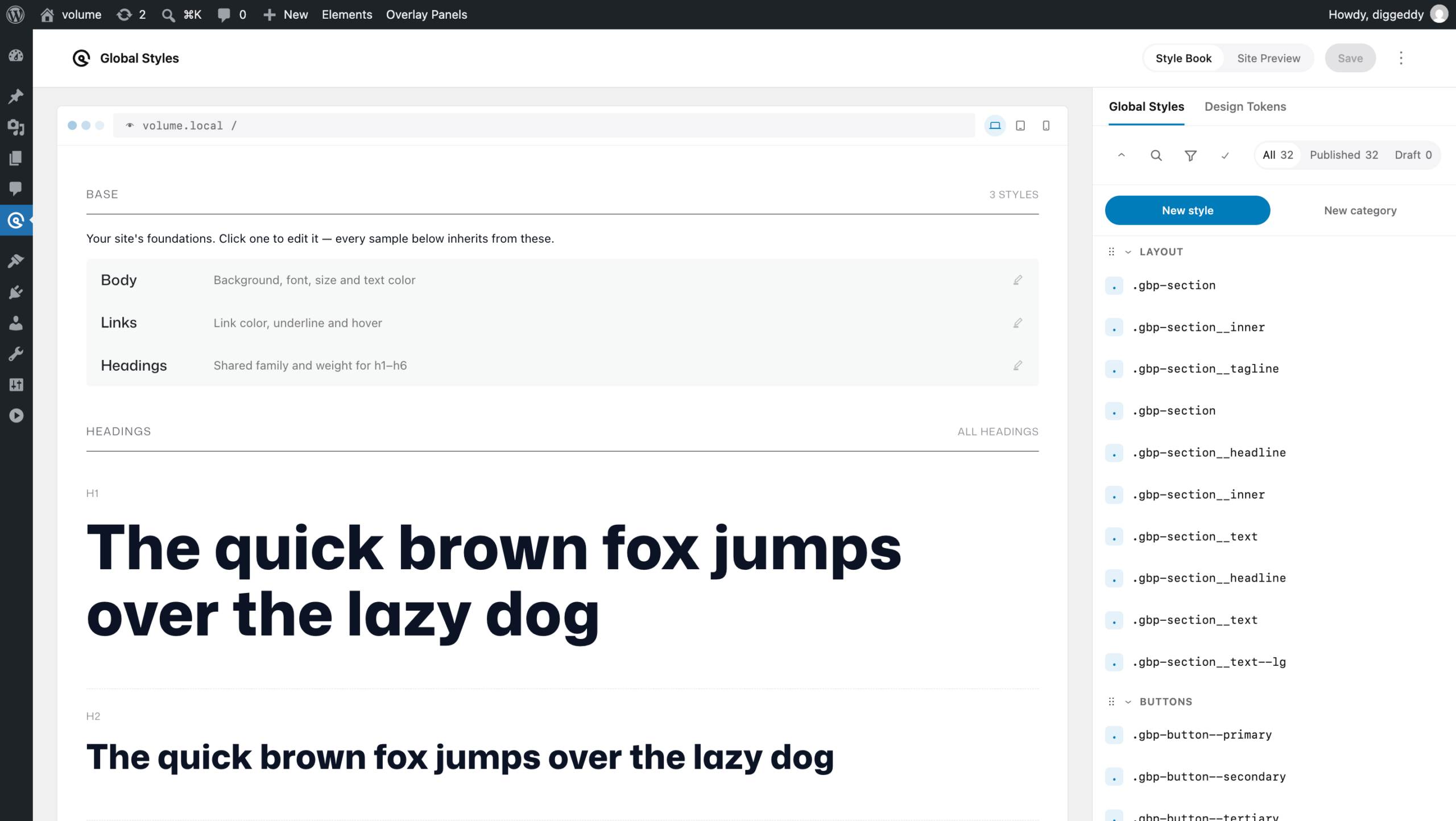
The sheet is organised into sections, each holding related HTML elements:
- Base – body, links and all headings
- Headings –
h1through toh6 - Text – Paragraphs, links,
strong,em,small,mark,blockquote, inlinecode,codeblocks and dividers - Lists – Unordered and ordered lists.
- Forms – Labels, text inputs, textarea, selects, buttons and field sets.
- Tables – Table with header row and body rows
- Media – Images, Figures and Captions
Editing an element
Click any element and its style opens in the Styles Builder panel on the right, where you edit it just as you would any Global Style. When you save, the change applies site-wide.
A few things make the Style Book quick to work in:
- Click the element itself to edit that exact style — click a heading to open `h2`, a link to open `a`, an input to open `input`.
- Click an element’s label to reach an element its own children cover up. A table, for instance, is filled by its cells; its label is the reliable way into the `table` style.
- Edit a group at once using a grouped affordance. The Headings section’s **All headings** link opens a single style targeting `h1`–`h6` together, so you can set a shared family and weight in one place.
- Use the keyboard – every specimen is focusable, and Enter or Space opens it.
Styles you open this way are marked “Opened from the Style Book” in the Global Styles list, so you can tell them apart from styles you built elsewhere.
Permissions
The Style Book follows your **Global Styles** management permissions. A user who can’t manage Global Styles doesn’t see the Design dashboard, and so doesn’t see the Style Book.